
Browsing articles tagged with "Linux Archives - Techtites"
Jun
13
2009

5 Excellent Backup Tools for Linux

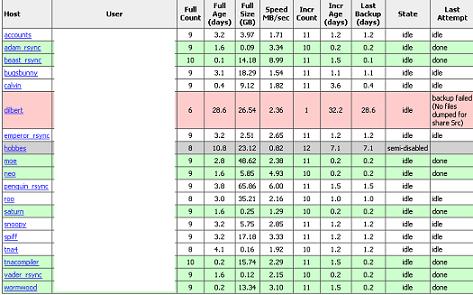
Featuring free Link backup applications for any sort of backup need. You can use these applications to perform a complete back up of a file, data, database, system or server. BackupPC (Graphical User Interface) BackupPC is a high performance free backup software suite for Linux that comes with a web-based user interface. It features clever pooling of identical files, no client-side software, and a powerful Apache/CGI user interface. BackupPC is highly configurable and easy to install and maintain. BackupPC incorporates a Server Message Block (SMB) client that can be used to back up network shares of computers running Windows. It…
Read the rest of this post…

Apr
20
2009

Useful Blog Editors For Linux Worth Trying

Not really a big fan of desktop blog editors but I think they can be really helpful if you seriously want to save your time and get things done quickly. Following are some of the best Blog Editors you can use if you’re machine is running on Linux. Gnome Blog: A free blog editor for Linux that allows you to write and publish quick posts without putting much effort to it. It comes with a very clean interface and doesn’t really get in the way of what you’re writing. It features WYSIWYG styled text support Entries can be written gradually…

Read the rest of this post…

Dec
23
2008

Partitioning in Linux – Try GParted

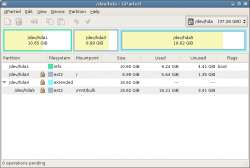
GParted is the Gnome Partition Editor application. GParted is an extremely feature rich software. It supports several different types of file formats through the use of their equivalent support programs. These include ext2, ext3, fat16, fat32, hfs, hfs+, jfs, linux-swap, ntfs, reiser4, reiserfs, ufs and xfs. GParted also includes a LiveCD which is available as an ISO or USB, PXE or on your Hard Disk. – Download GParted – Download GParted LiveCD

Dec
15
2008

Sing along with your music with AutoLyrix (Multimedia Monday)

Who doesn’t love singing with the music playing in the background. And singing is extremely easy when you have the lyrics of your favorite song in front of you. One option is to individually search for lyrics of your song online or alternatively, get hold of a simple software that does the job. AutoLyrix was designed to download Lyrics, AlbumArt (artwork) and SyncLyric (LRC files) automatically. Using Autolyrix is extremely simple. Download and install the software and run it. Run your favorite music player (see supported players) and play the song of your choice. I tried out several songs and…

Read the rest of this post…

Dec
10
2008

Optimize HTML with GuiTidy (Web Wednesday)

When writing HTML code, it is easy to make mistakes. Tidy is able to fix up a wide range of problems and to bring to your attention things that you need to work on yourself. Each item found is listed with the line number and column so that you can see where the problem lies in your markup. Tidy won’t generate a cleaned up version when there are problems that it can’t be sure of how to handle. These are logged as “errors” rather than “warnings”. GuiTidy is a simple software that uses Tidy to generate optimized code via a…

Read the rest of this post…

Oct
11
2008

Operating System in Operating System (Software Saturday)

Imagine the situation that you are running Windows Vista and need to run XP or even Linux. Well, you have two options before you, viz. install Linux or XP as a dual boot or run it within your Operating System as a virtual machine. There are two free softwares available that achieve the second purpose, viz. Microsoft Virtual PC and Sun VirtualBox. Microsoft Virtual PC I have been using Microsoft Virtual PC for years now. It’s built specifically for Windows and is optimized to run Windows itself. I’ve succeeded in installing Linux without the GUI. It is a lot easier…

Read the rest of this post…

Aug
27
2008

Live on the Bleeding Edge of WordPress with SVN (WordPress Wednesday)

Warning: This article explains how to keep your WordPress Blog running the latest sub-version build of WordPress. It is highly recommended that you do not use the sub-version builds in a production environment. They are meant for testers. While you are reading this article, please, please keep in mind that Forum support does not cover SVN. In other words, if you decide to use the bleeding edge code on your blog and have problems with the code, you probably will not receive help from the forums. About three years back I decided to launch a WordPress Demo Blog always running…

Read the rest of this post…