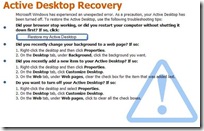
The screen above is shown to Windows users, primarily Windows XP whenever you’re using a wallpaper and your explorer crashes.
If you’re facing this problem repeatedly, you can either manually make changes or with a single click set everything to default.
You can use Desktop Hijack Fix to restore Microsoft Windows default settings for Active Desktop and remove any changes that had been made. It can also be used to backup your current Active Desktop configuration to be restored later if you choose to not restore Microsoft default settings. During running operation this tool has been designed to alert you if you active desktop settings have been hijacked based off your previous configuration.
Features:
Restores Windows Active Desktop and wallpaper back to original settings
Ability to backup and restore non-default desktop settings
Detects when your wallpaper or desktop settings have changed
Detects and removes common policy restrictions used by malware
We use cookies to ensure that we give you the best experience on our website. If you continue to use this site we will assume that you are happy with it.OkPrivacy policy