Skip to content

Posts from the ‘Media Players’ Category

2
Apr
iTunes-Playlist01.png

How to create a playlist from a folder in iTunes

iTunes allows you to quickly create a playlist which you can create either manually by selecting files from your library or alternatively a smart playlist based on certain criteria. However, one lesser known feature is creating playlists from a folder on your hard drive.

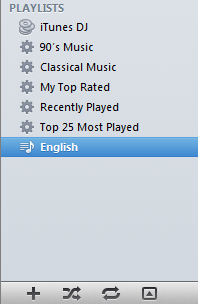
Creating a playlist from a folder is a simple two step process. The first step is similar to creating any other playlist. Hit + sign at the bottom left of your screen and give your playlist a name.

Step 1: Create a playlist

Once you have your playlist created, all you need to do is drag and drop the folder which contains your music on the playlist entry that you just created.

Step 2: Drag the folder on the playlist

iTunes will automatically read all the files in the folder and add it both to the playlist, as well as your music library. The next time you sync your iPod, iPad or iPhone with iTunes, the new playlist that you created will be copied onto the device, ready for you to play!

Do you have a cool iTunes tip? Comment below and let us know.

About Ajay

A die-hard blogger, web developer, biker, singer, geek, non-stop talker, foodie, movie freak are just some of the words that begin to describe me.

4
Apr

Convert videos easily with Daniusoft Video Converter Free

In February we covered Daniusoft Media Converter Ultimate, which is powerful converter with the ability to remove DRM. A few days back, Daniusoft rolled out a free version of their video converter.

Video Converter can not only convert video/HD Video to AVI, WMV, MPEG, MOV, FLV, MP4 easily and quickly. but also can extract audio from video to MP3, WAV, WMA.

Daniusoft Video Converter

In addition, this free video converter allows you to DIY your video with video editing options: cropping video, trimming video length, merging two or more video clips, adjusting video effect etc.

Key features:

  1. Convert any video to popular video audio formats. Source files are ource files like AVI, MP4, MPEG, 3GP, AAC, RAM, MTS, M2TS, TS, HD AVI etc. to MP3, WAV, AAC, WMA, MPEG1, MPEG 2, MP4, AVI, WMV, MOV, FLV, to AVI, WMV, MPEG, MOV, FLV, MP4, MP3
  2. Batch conversion for up to 5 files
  3. Extract audio from video files
  4. Basic video editing settings including cropping, trimming and adding effects

Download Daniusoft Video Converter Free

About Ajay

A die-hard blogger, web developer, biker, singer, geek, non-stop talker, foodie, movie freak are just some of the words that begin to describe me.

19
Jan
tubepress

TubePress – A video gallery plugin for WordPress

You may have figured that we here at Techtites have a thing for WordPress. And who can blame us, right?

As a blogger there are many times I’ve thought about putting up a gallery of videos. This is especially handy if you run a media blog or generally do a lot of video tutorials.  There are quite a few media player plugins out there that will help you either embed videos on your blog or play videos for you, but very few that allow you to setup a gallery, and none that are easier to use than TubePress.

From the TubePress site:

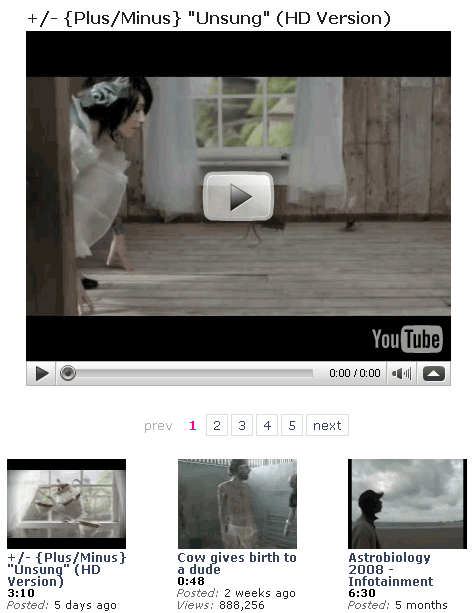
TubePress is an open source PHP library that displays gorgeous YouTube video galleries in your blog. It’s available as a WordPress plugin or as a stand-alone PHP library (which costs $10).

TubePress

Here are a few of the features that makes this plugin such a no-brainer:

  1. You can have 12 types of galleries: Galleries based on your YouTube playlist, YouTube User, Favorites and Youtube’s featured videos to name a few.
  2. You can choose how to watch the video: Within your post or page, in a pop-up window or using lightbox or greybox.
  3. You can customize the thumbnail gallery: Set the order of videos, number of videos per page, limit video descriptions, etc.
  4. Customize the Youtube Flash player: Set the height and width, turn on / off auto play, etc.
  5. Customize what shows up under each thumbnail: Author, Date uploaded, Runtime, etc.

The list is pretty long. You can find the entire feature list here.

A major advantage of using YouTube is that even those who don’t visit your blog will probably see your videos. And to increase traffic to your site or blog all you have to do is make sure you describe your videos properly.

Another  really cool thing about this plugin is that you can have multiple galleries. You can create a different playlist for each new gallery and publish only those videos that you want to show. Or you can just have a gallery page where TubePress will list all the videos uploaded by a specific user. You can even have it pull the top rated or most viewed videos on YouTube.

Best of all, TubePress has been released under the GNU General Public License (version 3). So if you know your way around php you can modify it and do a whole lot more.

Even if you don’t know php, you can still customize the look of the plugin if you know CSS. Of course, I wouldn’t recommend doing anything because the gallery looks really simple and beautiful and will look great on almost any blog / site.

Eric D Hough gets a big thumbs-up from me for creating such an awesome plugin and for taking the trouble to maintain and update it.

You can download TubePress and read the entire documentation if you’re stuck.

If you do decide to use it, let us know what you thought of it.

About Nikhil

I'm a 23 year old Web & Graphic designer, currently living in Mumbai, India. Most of my time is spent on the internet browsing through new ways and means of betting myself at what I like to do. As a big guitar enthusiast, I enjoy listening to a lot of Blues, Jazz and a few select rock and roll bands. Classical, if I'm in the mood.

5
Jan

Download Videos from Free Internet Video Sites

Maybe a clichéd title, but a true one indeed.

Miro is a free application for channels of internet video (also known as ‘video podcasts and video rss). Miro is designed to be easy to use and to give you an elegant fullscreen viewing experience.

There are thousands of free internet video channels that you can watch. You’ll be able to download all the videos that each channel offers and when new ones are released, Miro will grab them automatically.

Miro is an extremely feature rich program. Some of the top features are:

  • Complete support for HD Videos
  • Miro can play MPEG, Quicktime, AVI, H.264, Divx, Windows Media, Flash Video, and almost every other major video format.
  • Create video playlists, manage your music via a library
  • Download videos via BitTorrent and then watch them from within Miro itself.
  • Subscribe to Video RSS feeds and download videos from them
  • Search and download videos from the YouTube, Yahoo!, Google Video, Blip, and more.
  • Includes the built-in and web accessible Miro Guide, which is a full-featured web service that is simply the most intuitive, most elegant, and most useful catalog of video RSS feeds anywhere.
  • The best part. It’s open source with a very active community.

Miro

Download Miro for:
- Windows
- Mac OS X
- Ubuntu

About Ajay

A die-hard blogger, web developer, biker, singer, geek, non-stop talker, foodie, movie freak are just some of the words that begin to describe me.

29
Dec

Blank screen in your videos? Here are three solutions

Facing a blank screen in your videos? Or maybe you can’t hear the audio playing? Today almost all avi movies are compressed with DivX, Xvid or similar codec packs. Here are three that I have used at different points of time. You need to pick only one.

K-Lite Mega Codec Pack

K-Lite Codec Pack is a collection of codecs, DirectShow filters and tools. Codecs and DirectShow filters are needed for encoding and decoding (playing) audio and video formats. The K-Lite Codec Pack is designed as a user-friendly solution for playing all your movie files. With the K-Lite Codec Pack you should be able to play all the popular audio and video formats and even some rare formats. [Our Review]

Vista Codec Package

Vista Codec Package does not contain a media player software and it will not associate filetypes. With this package installed you will be able to use any media player, limited only by the players’ capabilities, to play all movies and video clips. Streaming video is supported in several formats in all popular web browsers.

Codec Pack All-In-1

This is a relatively small codec package. It includes only the bare essential codecs but are more than sufficient to play most of the video formats.

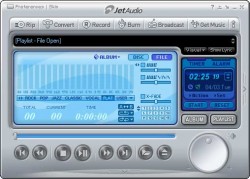
Well, and a well known secret. If you are only interested in playing movies, you don’t really need a separate codec pack installation. You can just use VLC, JetAudio or similar players which include the support inbuilt. Installing codecs ensures that all players are automatically supported.

About Ajay

A die-hard blogger, web developer, biker, singer, geek, non-stop talker, foodie, movie freak are just some of the words that begin to describe me.