Skip to content

Posts from the ‘Social Networking’ Category

14
Apr

Chat with your Facebook friends with Facebook Messenger

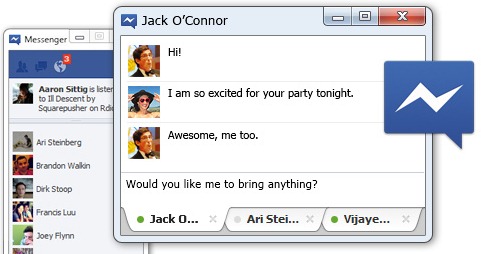
Messenger is a new app that brings Facebook to your desktop. While you surf the web or use other applications on your computer, you can:

  • Chat and message with your friends on Facebook
  • See the latest updates from your friends in ticker
  • Get quick notifications about what’s going on

Messenger lets you use Facebook without being on www.facebook.com. You will now be able to stay in touch anytime, no matter what you’re doing.

Facebook Messenger

Facebook Messenger is available for Windows 7 with an app for Windows Vista in the pipeline.

Download Facebook Messenger

About Ajay

A die-hard blogger, web developer, biker, singer, geek, non-stop talker, foodie, movie freak are just some of the words that begin to describe me.

28
Nov
Twimbow.jpg

Add colour to your Twitter experience with Twimbow

Are you following a few hundred people on Twitter? If you do, then you’ll realise that the frequent updates on Twitter are close to impossible to follow, unless you’re monitoring Twitter continuously. Twimbow is a web application that helps any social media user to engage their network of friends more effectively, by organizing and enriching their conversations online.

Twimbow

The key feature of Twimbow is its ability to make your twitter feeds more manageable by colour coding them. However, Twimbow goes over and beyond just that. You have an integrated ability to manage your twitter followers, filter hash tags and more. You can also share your tweets on Facebook or save them on Instapaper.

Twimbow also lets you quickly browse through your mentions, sent and received DMs and your statuses that have been retweeted. One really good feature is to schedule your tweets. With this, you can easily spread multiple tweets over the day or on a daily basis.

The app uses Oauth and so it easily logins to your twitter and fetches content seamlessly without any major effort on your part. Of course, you’ll need to set this up the first time. And, if you are a Google Chrome users, you can get hold of the Twimbow extension from the Chrome store.

About Ajay

A die-hard blogger, web developer, biker, singer, geek, non-stop talker, foodie, movie freak are just some of the words that begin to describe me.

1
Mar
comments

Facebook Improves Its Comment Box on Websites

Facebook has just announced a number of improvements it has introduced to its comments box on websites. These improvements are:

1. Increased Social Relevance

Comments are ordered to show users the most relevant comments from friends, friends of friends, and the most liked or active discussion threads, while comments marked as spam are hidden from view.

In the example below, Cat is my friend and I see her comment first:


2. Better Moderation Tools

New moderation tools have been added based on developer feedback. Admins can choose to make the default for new comments entered either “visible to everyone” or “has limited visibility” on the site (i.e., the comment is only visible to the commenter and their friends), to help mitigate irrelevant content. Admins can moderate on the Comments Box directly or on the moderation dashboard. The moderation dashboard, accessible from a link on Settings, aggregates comments from all Comments Boxes across your site and shows a public and admin view.


3. Improved Distribution

Comments can now be more are easily shared with friends or with people who like your Page on Facebook, opening up your content to a wider audience. If a user leaves the “Post to Facebook” box checked when she posts a comment, a story appears on her friends’ News Feed indicating that she’s made a comment on your website, which will also link back to your site.


4. Enabling other login providers

In addition to Facebook for login, you can also give users the option of logging in and commenting with other login providers (option is set via the “Settings” link). If the user does not have a Facebook account or is not logged into Facebook, she can comment with other accounts to leave a comment. We plan to add other login providers soon.


Instructions on how to integrate the new comments box on your website can be seen at http://developers.facebook.com/blog/post/472


About Umar

Umar is a professional content writer all the way from Pakistan. He loves discovering and reviewing new websites. He blogs at http://www.techcityinc.com

25
Dec
PickZip.jpg

Download photos from Facebook with Pick&Zip

Facebook has become a powerful medium to share your photographs. Even I took the plunge a few months back when I came to London. The best feature of Facebook’s photo support is the ability to tag your friends in photos. Usually, these are photos that you do not own and I am sure you’ve love to have a copy of them for your records.

You could go about the long drawn way of downloading these one at a time, or you grab hold of a utility that would do the job. One such software is Pick&Zip.

PickZip

Pick&Zip is a totally free online tool that will allow you downloading photos from Facebook in a single zip or pdf file.

Using Pick&Zip is very simple. All you need to do is login to the app using your Facebook profile and it will display to you a list of friends. You can select any of your friends and download the images that they have been tagged in. Or, you can select “Find my photos” and it will display all the photos that you have been tagged in. Select the images you want and download these either individually or as a group. I preferred to simply download all the 138 tagged photos and albums that I had (yes I am not that popular) in zip file format.

The software worked beautifully with all the photos neatly sorted into separate folders and now I have a backup of all the photographs that I have been tagged in.

Lastly, have you liked our Facebook page yet?

About Ajay

A die-hard blogger, web developer, biker, singer, geek, non-stop talker, foodie, movie freak are just some of the words that begin to describe me.

9
Apr
ChitChatforFacebook.png

Chit Chat for Facebook

Do you use Facebook chat often? I know I do and it can get really cumbersome to keep my browser window open all the time while chatting. 

Introducting Chit Chat for Facebook.

Chit Chat for Facebook

Features:

  • Convenient and fun way to chat with your Facebook contacts without the hassle of surfing Facebook
  • No need to keep your web browser logged into Facebook
  • Tabbed interface for chatting making it easy to talk to many friends at once
  • Receive notifications when you receive an instant message
  • Save Facebook Chat conversations, format their messages – including adding emoticons, and send Facebook wall posts

Download Facebook

About Ajay

A die-hard blogger, web developer, biker, singer, geek, non-stop talker, foodie, movie freak are just some of the words that begin to describe me.