
Skip to content

Posts from the ‘Linux’ Category

13
Jun
backuppc

5 Excellent Backup Tools for Linux

Featuring free Link backup applications for any sort of backup need. You can use these applications to perform a complete back up of a file, data, database, system or server.

BackupPC (Graphical User Interface)

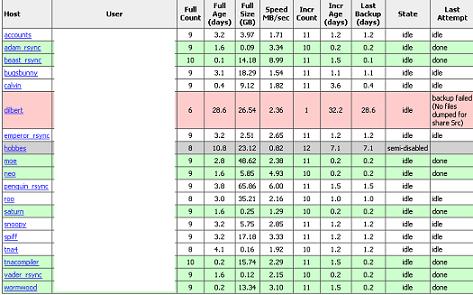
BackupPC is a high performance free backup software suite for Linux that comes with a web-based user interface. It features clever pooling of identical files, no client-side software, and a powerful Apache/CGI user interface. BackupPC is highly configurable and easy to install and maintain.
backuppc

BackupPC incorporates a Server Message Block (SMB) client that can be used to back up network shares of computers running Windows. It also supports DHCP clients as long as the client is registered with a name service such as DNS, Active Directory, or LDAP.

afBackup (Command-line)

afBackup is a free Client-Server Backup System that allows many workstations to backup to a central server. t is used to maintain archives on a backup server host or in a file. Archives can be created, extracted or their contents be listed.

afkbackup

It features

  • Authentication of the client is performed before it can take over control
  • Several servers can be configured for each client: the actual server is chosen by availability
  • Multi stream server, several clients can store to one server at the same time
  • Remote start option -> centralized administration
  • Access restriction for the streamer device -> security
  • Client-side per-file processing -> reliability. If the files and directories were first packed and then processed, by the server a single faulty bit in the processed stream would make the rest of the backup unaccessible for restore
  • Built-in compression (requires libz)
  • Data stream is written to tape in pieces of configurable size -> fast finding of files during restore
  • Tape position logging for each file -> fast finding of files during restore
  • Tape capacity is fully used
  • Flexible tape handling and configurable append mode
  • Full/incremental backups and verify
  • Raw partitions can be saved
  • Ordinary users can run the restore for their own files and directories, but only for these
  • Emergency recovery on different catastrophe levels
  • Command output saving feature: useful e.g for databases
  • Cartridge locations database maintained
  • Support for media changers
  • Client access to cartridge sets can be restricted

Flyback (Snapshot backups)

FlyBack is software for system backup and restore, which offers similar functionality to the Mac OS X Leopard’s Time Machine. FlyBack is a snapshot-based backup tool based on rsync. It creates successive backup directories mirroring the files users want to backup, but hard-links unchanged files to the previous backup. It has almost all of the required technology already built in to recreate it. This is a simple GUI to make it easy to use.

Flyback

Key features include

  • Uses crontab to automate backups and cleanups
  • Has a graphical user interface (or can be run from a console)
  • Scans the entire directory structure when performing a backup
  • Selectively delete specific backups, yet retain files stored in previous backups
  • Offers a chronological view of a file system, allowing individual files or directories to be previewed or retrieved one at a time

rsNapshot (Synchronisation)

rsnapshot is a filesystem snapshot utility for making backups of local and remote systems. It can take incremental backups of local and remote filesystems for any number of machines. rsnapshot makes extensive use of hard links, so disk space is only used when absolutely necessary. rsnapshot is written entirely in Perl. It should work on any reasonably modern UNIX compatible OS, including: Debian GNU/Linux, Red Hat Linux, Fedora Linux, SuSE Linux, Gentoo Linux, Slackware Linux, FreeBSD, OpenBSD, NetBSD, Solaris, Mac OS X, and even IRIX.

snapshot

Key features include

  • Uses rsync to transfer data
  • Can be used over ssh
  • Supports multiple levels of backup such as monthly, weekly, and daily
  • Stores previous versions as actual files and hardlinks to save space
  • All versions of the backup are accessible as plain files
  • NFS mounted user restores
  • Filename filters
  • Removable media

CloneZilla

Based on DRBL, Partition Image, ntfsclone, partclone, and udpcast, CloneZilla allows you to do bare metal backup and recovery. It offers 2 type of backup programs including CloneZilla Live and Clonezilla server edition. It is suitable for single machine backup and restore. While Clonezilla Server Edition is for massive deployment, it can clone many more than 40 computers simultaneously.

clone

Key features of CloneZilla

  • Free (GPL) Software.
  • Filesystem supported: ext2, ext3, ext4, reiserfs, xfs, jfs of GNU/Linux, FAT, NTFS of MS Windows, and HFS+ of Mac OS. Therefore you can clone GNU/Linux, MS windows and Intel-based Mac OS. For these file systems, only used blocks in partition are saved and restored. For unsupported file system, sector-to-sector copy is done by dd in Clonezilla.
  • LVM2 (LVM version 1 is not) under GNU/Linux is supported.
  • Multicast is supported in Clonezilla SE, which is suitable for massively clone. You can also remotely use it to save or restore a bunch of computers if PXE and Wake-on-LAN are supported in your clients.
  • Based on Partimage, ntfsclone, partclone, and dd to clone partition. However, clonezilla, containing some other programs, can save and restore not only partitions, but also a whole disk.
  • By using another free software drbl-winroll, which is also developed by us, the hostname, group, and SID of cloned MS windows machine can be automatically changed.

About Umar

Umar is a professional content writer all the way from Pakistan. He loves discovering and reviewing new websites. He blogs at http://www.techcityinc.com

20
Apr
blogit

Useful Blog Editors For Linux Worth Trying

Not really a big fan of desktop blog editors but I think they can be really helpful if you seriously want to save your time and get things done quickly. Following are some of the best Blog Editors you can use if you’re machine is running on Linux.

Gnome Blog: A free blog editor for Linux that allows you to write and publish quick posts without putting much effort to it. It comes with a very clean interface and doesn’t really get in the way of what you’re writing.

blogit

It features

  • WYSIWYG styled text support
  • Entries can be written gradually over the course of a day, popping gnome blog open and closed as you have thoughts to jot down and then posting at the end of the day
  • Operates as a panel object/applet or a standalone application
  • Supports many different kinds of blogs
  • New Spell checking
  • New Drag and drop images into your blog entry (if your blog supports it)

BloGTK: It is a weblog client that lets you post to your weblog from GNOME without the need for seperate browser windows. With BloGTK you can connect with many other weblog systems such as Blogger, Movable type and WordPress.

blogtk

Thingamablog: After reading a few reviews about this editor I can easily say that it just more than just a blog editor. Thingmablog allows you to create, edit, publish and maintain your blog right from your desktop without much hassle. If you are looking to start your own blog and want to manage everything right from the desktop, this will be a great tool for you.

linux

Thingamablog allows you to:

  • Set up a blog in minutes via an intuitive wizard
  • Maintain multiple blogs
  • Effortlessly manage thousands of entries
  • Dynamically update blog content
  • Write entries offline (Dialup users)
  • Publish your blog with a single click
  • Publish remotely to your blog via email
  • Read news with an integrated feed reader
  • Make posts from your favorite feeds
  • Create a unique layout with customizable templates
  • Import entries from RSS/Atom feeds
  • Set up flexible archiving options
  • Organize your entries by category or date
  • Save entries as drafts
  • Define your own custom template tags
  • Syndicate your blog via an RSS or Atom feed
  • Ping services like weblogs.com, BlogRolling, and Blo.gs

If any of these doesn’t come up to your expectation than you can also try out other options such as ScribeFire and QTM.

About Umar

Umar is a professional content writer all the way from Pakistan. He loves discovering and reviewing new websites. He blogs at http://www.techcityinc.com

30
Jan
ubuntu-pocket-guide

Free Ubuntu Pocket Guide – Starters Learning Book

If you are a Ubuntu newbie and want to learn how to install, configure Ubuntu etc, this free e-book is for you. It is written by Keir Thomas and is one of the best books for people who are new to Ubuntu and want to learn the basics. It’s a 170 Page ebook which covers everything from installation and configuration to security and command-line tricks.

Table of Contents are:

1. Installing Ubuntu
2. Configuring Ubuntu
3. Getting to grips with the desktop
4. Users and the filesystem
5. Hands-on at the command-line
6. Software management
7. Securing the system

* Appendix A: Glossary of terms
* Appendix B: Learning more and getting help

ubuntu-pocket-guide

Download Ubuntu Pocket Guide
Download Ubuntu Pocket Guide (Alternative Link)

About MoiN

14
Jan

Fix the Windows Live Writer and WordPress stripping tags issue

I’ve been using Windows Live Writer to write posts for several months now. This has primarily been for my blog posts at Weblog Tools Collection. I decided to start using WLW for Techtites and AjayDSouza.com.

I was able to add both the blogs properly and made my first blog post. Uploaded the post to my website and noticed gibberish. On closer observation, I realized that the < and > were stripped out completely. As a result, code like <p><a href="http://techtites.com/">Techtites</a></p> became pa href="http://techtites.com/"Techtites/a/p. I manually had to edit the post to correct this post. I noticed the problem at both the blogs which are running WordPress 2.7. I initially suspected this to be the reason, and so decided to search.

Came across this article by Joseph Scott. Joseph is one of the developers of WordPress. He writes:

A gradually growing list of people have run into a very odd problem using XML-RPC methods in WordPress, where the left angle bracket ( < ) gets stripped. There’s been a fair bit of discussion about this on ticket #7771. The bottom line: the behavior of the PHP XML extension when built against newer versions of libxml2 changed, such that left angle brackets get stripped when parsing XML.

There’s been some back and forth between libxml2 folks (email list) and the PHP folks (bug 45996), with no real solution for those using the tainted versions of libxml2. So what are your options if you’ve got this problem?

There are currently two solutions to this problem.

  1. Downgrade to a lower version of libxml2. v2.6.30 has been known to work.
  2. Build PHP with expat parser instead of libxml2

Unfortunately, both solutions require you to have root access to your server. If you don’t you can write to your host and point them to this solution.

I decided to go ahead with option 1. Codehead has a good tutorial on downgrading to libxml v2.6.30 for users running cPanel. Non-cPanel users can check out the tutorial by Pete.

The procedure is rather simple. All I had to do was copy-paste the code into the Linux command prompt, edit two files and I was good to go. It’s been running fine for nearly a week now.

If you don’t have root access, you’ll have to just wait it out before the libxml2 and PHP folks sort their differences out!

Update: HooFoo.net has published a possible fix by editing three WordPress files. I haven’t tested this out myself. If any of you try it let me know. The following code has been added to the files:

//xmllib 2.7.0 -2.7.2 stripping leading angle brackets bug patch
if(LIBXML_DOTTED_VERSION == ’2.7.0′ ||
LIBXML_DOTTED_VERSION == ’2.7.1′ ||
LIBXML_DOTTED_VERSION == ’2.7.2′) {
$xml =str_replace("&amp;lt;","&amp;lt;",$xml );
$xml =str_replace("&amp;gt;","&amp;gt;",$xml );
$xml =str_replace("&amp;amp;","&amp;amp;",$xml );
}
//end Fix

I’ve modified the files myself and made them available for you. Download the zip and extract the files in your WordPress 2.7 root directory. The zip file maintains the necessary directory structure, so zipping in the root directory is sufficient. The files should work with only WordPress 2.7 and are not meant to be installed on any other version.

Update: Users have reported mixed results with the attached fix. It works for some and doesn’t for others. If it’s not working for you check if the files have been uploaded in the right place. Alternatively, try making the changes manually as listed in the tutorial by Hoofoo.

Download WordPress 2.7 XML Strip-tag Fix.zip from DivShare [25KB]

About Ajay

A die-hard blogger, web developer, biker, singer, geek, non-stop talker, foodie, movie freak are just some of the words that begin to describe me.

23
Dec

Partitioning in Linux – Try GParted

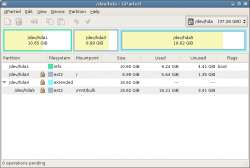
GParted is the Gnome Partition Editor application.

GParted is an extremely feature rich software.

It supports several different types of file formats through the use of their equivalent support programs. These include ext2, ext3, fat16, fat32, hfs, hfs+, jfs, linux-swap, ntfs, reiser4, reiserfs, ufs and xfs.

GParted

GParted also includes a LiveCD which is available as an ISO or USB, PXE or on your Hard Disk.

- Download GParted
- Download GParted LiveCD

About Ajay

A die-hard blogger, web developer, biker, singer, geek, non-stop talker, foodie, movie freak are just some of the words that begin to describe me.