Full In-Depth Review of the Ice Cream Sandwich Android 4.0 OS
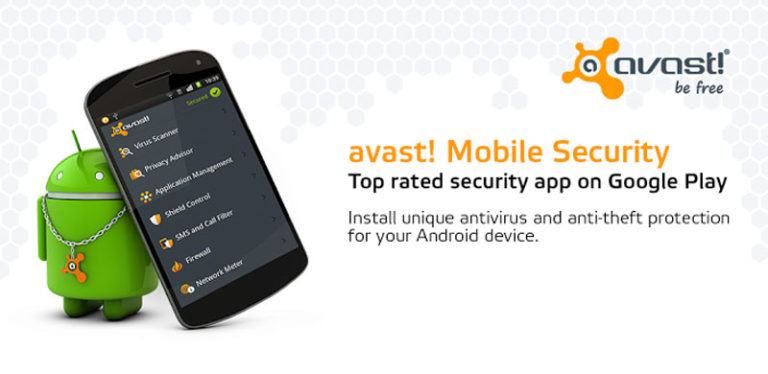
The Android operating system has always been a powerful workhorse and a great choice for technical geeks; however, it lacked the fun aspect. Enter the latest in the line of Android versions, the Ice Cream Sandwich (ICS). Reconstructed totally from the ground up, it is now packed with a host of features that none will find lacking. The system is not just a revision of previous versions, but is actually significantly different from the older gingerbread version.

(Courtesy of abulhussain)
The first most obvious change to strike one is the elimination of all the physical navigation buttons. They are replaced with virtual buttons that come alive under ones fingers by glowing and throbbing. Eye-catching animations moving slowly fill the home screen and there is a larger variety to choose from in the apps tray and if one desires, photo gallery.
Another cool convenience is that when a user reads an email message, the screen can be moved to the left or right of the message that is being read. This allows one to see the message that came before the current one or the one which comes after. This movement can be carried out by flicking the screen. The flick gesture is common throughout the new OS and can be used to get rid of alerts in the notifications list, browser thumbnails and in any application that was used recently.

(Courtesy of laihiu)
The home screen widgets can now be resized. A brand new calendar app allows cells to expand and collapse by just pinching; this allows the viewing of large or small time periods. The web browser is now considerably faster and includes a really handy feature that allows one to save material for offline reading. The Request Desktop Site is also found in this same menu, which allows one to navigate away from the mobile-optimized view of the browser.
Google has also improved the voice-controlled text input. It is more accurate, even if just by a tad bit. The feature controlling voice now reveals words being dictated at a very slow real-time pace. While not the most accurate of implementations, it does manage to get by and one does not have to hit “done” to see the material that has been dictated. The security hardware, too, has gotten a bit of an upgrade. Buried deep within the Settings menu, is the Face Unlock feature, which utilizes facial recognition technology to match the mug with the security system. It is set up by allowing the front-facing camera to scan the face and upon completion, one selects a secondary unlocking tool that acts as a fail-safe in case the Face Unlock does not work. The security system can be set up very easily, but it is easy to fool and fails fairly frequently. Additionally, it is not really very fast; entering a key code is much faster. This makes one wonder, why bother with it at all? What is more troublesome is the fact that it can be easily fooled. Cell phones using this feature can be unlocked by holding a photo of the phone owner in front of the locked screen.
A far more practical feature is the Data Usage tool, also located in the Settings menu. This allows one to see the amount of data one has accessed on a timeline over a number of days. It is possible to set a warning, so as one nears the limit of their plan they can cut back. There are also many photo and video functionalities packed in the system that allow one to edit their captured material. Additionally, there is a new People app that can roll up the contacts list and extend social media functionality in one place. All the contacts can be viewed through thumbnails. Just click on a thumbnail and one gets a nice contact profile, showing their email address and the most recent Google activity. Also, the profiles of these people will spring up throughout ICS. When one clicks on the image of someone from whom an email has come, the People profile pops up showing all the different ways of contacting them.
The Ice Cream sandwich is packed full of really brilliant features. The operating system immediately puts all cell phones using the ICS way beyond other Android competitors.
This is a guest article by Ruben Corbo, a writer for the website Cell Phone Expert where you can compare cell phone plans.
About Ajay
A die-hard blogger, web developer, biker, singer, geek, non-stop talker, foodie, movie freak are just some of the words that begin to describe me.
3 Disadvantages to Using a Broadband Dongle
The broadband internet market has grown significantly over the years, leading to a lot of new innovation and the ability to access the internet using a modem of your choice. One great device that was introduced over the years is the mobile broadband dongle, and it is currently one of the most popular devices used to access the internet due to its flexibility, the security it offers and several other advantages. Personally, I believe that using a mobile broadband dongle can be a smart decision, but that doesn’t mean it doesn’t have disadvantages and I think we all need to know about its disadvantages before deciding to use it. This article will be listing 3 major disadvantages to using a broadband dongle.
Speed is Limited
The number one disadvantage to using a broadband dongle is that the speed you get with it is limited. With other forms of broadband internet service you can easily get better internet speeds without having to buy a new modem or take any extra measure. This isn’t the case with the broadband dongle, and presently, the two major forms of broadband dongle provide internet speeds of 3.2mbps and 7.6mbps. What that means is that if you want faster internet access you still can’t get it with such a dongle even if your ISP is providing better speeds. If you don’t think you will need to use up to 7mbps data transfer in any given period then going for a broadband dongle might be a smart decision on your part.
You are Restricted to the Same Interface
One thing I really dislike about using a broadband dongle is that you are restricted to the same interface. For example, if you are to decide to tether your mobile phone with your computer, aside your phone PC suite, there are countless applications available online to help you with that. If you decide to change ISP and as a result use the dongle you purchased from your current ISP with a new ISP you will be forced to use the interface of your old ISP.
It Isn’t Easily Accessible
Another major drawback to using a broadband dongle is that it isn’t easily accessible. By this, I’m not trying to say you can’t get it easily, what I mean is that you can hardly get a broadband dongle that isn’t a 3.6mbps dongle or a 7.2mbps dongle. I believe people should be able to get faster dongles, or if possible, custom tailored dongles, but that isn’t possible at the moment.
Paul T is a broadband expert who helps people choose the best pay as you go dongle.
About Ajay
A die-hard blogger, web developer, biker, singer, geek, non-stop talker, foodie, movie freak are just some of the words that begin to describe me.
Samsung Galaxy R – Missing in Action
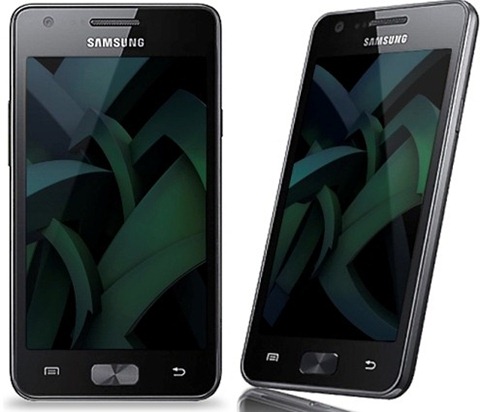
Samsung’s Galaxy R is the Galaxy S2’s little sibling. Like any younger brother, its arrival will be celebrated, but in a more muted manner than that afforded the S2. As with any eagerly-anticipated newborn, information on Galaxy R contracts is subject to change: there’s only so much you can glean from a blurry in utero scan. We know it’s going to be a looker, but how’s this pocket-sized bundle of joy going to behave when it’s unleashed kicking and screaming into the world? For now, here’s a rundown on what’s changed and what’s the same with the Galaxy R, and why its verisimilitude to the pricier S2 is a good thing.

A little heavier at 132g, the Galaxy R has a tiny 1mm addition to its chassis, but a 4.2 inch ‘super-clear’ LCD screen that’s smaller than the S2’s. Ok, so it’s only a 2.5mm difference, but for some people, size definitely matters. The Galaxy R does have a metal back, which gives it a more professional finish, added, perhaps to cover up its shortcomings elsewhere. You see, the Galaxy R was intended to be the next must-have smartphone, packed with features, but composed of less expensive materials to bring the price down a notch. The question is, do these savings affect the usability?
Well, the 5MP camera isn’t quite as good as its predecessor’s, but it does have 720p HD video capture. A 1.3MP camera on the front is used for video calling, and might atone for some of the misgivings over the primary camera. The 1GHz Tegra 2 chip also means Tegra 2 games are ready to play: you’ll have the Tegra Zone app section on the Android market at your fingertips. This is also aided by a GeForce GPU, meaning games will be faster and web browsing quicker. Indeed, there’s certainly no lag to be found when you put the phone through its paces. Swipe quickly through screens, load and cancel apps and click back to the home screen in a flash: it’s a speedy little number. You’ll find all the usual Android features like WiFi, GPS and 3G, making it easily as powerful as the major high-end handsets. The phone will apparently give ten hours of talk time, and 23 days’ standby time, so it certainly looks like a goer. 8GB of built-in memory comes in at a little less than that which the S2 is packing, but then this was always expected to be the case.
The main problem with the Galaxy R is that we don’t know where it is. That’s right, the phone has been posted MIA. The Galaxy R has been eagerly awaited for months, but there’s not even a sniff of it in the UK. The talk is that Samsung may have infringed one of Apple’s copyrights somewhere along the line, thereby delaying the launch of the Galaxy R mobile phone deals in the process. To further compound the disappointment, the price of the handset – when it finally materialises – may further dampen the hype. What was hoped to be a cut-price Galaxy S2 may not prove to be quite so cheap after all, based on the pricing in other parts of the world. The Galaxy R may yet prove to be a winner, but to stand a chance of making the podium, first it’s gonna have to show up at the races.
This is a guest post by Simon from Best Mobile Contracts.
About Ajay
A die-hard blogger, web developer, biker, singer, geek, non-stop talker, foodie, movie freak are just some of the words that begin to describe me.
4G Mobile Broadband Providers – How they Stack Up
With all the recent talk about 4G service and its blazing speeds, there is much debate as to which service will provide the best download and uploads transfers. There are basically three networks that are dominating the internet landscape and include LTE, WIMAX, and HSPA+. There are differences between these services which are explained below to help you choose the right service for you and your family.

LTE Technology
LTE, also known as Long Term Evolution, is a form of 4G network that is used by Verizon. In theory, LTE can provide download speeds of up to 100 Mbps and upload speeds of 50 Mbps. Many mobile broadband customers will never reach these speeds on their phones, as network bandwidth is distributed amongst millions of users. Public speed tests, however, have shown that download speeds on an LTE network can average as high as 30 Mbps depending on location.
In order to receive such fast download speeds, the Verizon phone that you are using must be 4G-compliant. It should be noted that download speeds are nearly twice as fast most internet providers which only claim to be 4G. Ultimately, Verizon plans to provide complete 4G access from the west to east coast.
WiMAX Network
Sprint currently uses the WiMAX network to provide 4G speeds in select locations. Once again, a 4G Sprint phone will work to its highest potential but only if the internet providers in your area are linked to its technology. Sprint operates using a 2.5 GHz band that uses IEEE 802.16e specifications that allow for theoretical download speeds of up to 128 Mbps. With the network loads that are met by Sprint, much of this is only in theory. Download speeds on Sprint’s 4G WiMAX network provide average speeds of up to 4-5 Mbps. If the 4G service is not available in your city, Sprint still uses a 3G network that provides speeds of up to 3 Mbps.
Is HSPA+ Really a 4G Network?
The next type of network that is used is the HSPA+ network. Standing for High Speed Packet Access, this network is actually just an improved version of their 3G network. AT&T currently uses this as their primary network for its mobile broadband and is scheduled to develop an LTE network in the upcoming year. In order to keep up with its fellow competitors, AT&T has begun branding their improved 3G network, HSPA+, as 4G. This has drawn some skepticism from critics who claim that the system is nothing more than a 3G service that is slightly improved.
T-Mobile is another provider that currently runs on a HSPA+ network. Download speeds are between two and seven Mbps depending on location and network load. One benefit of this service is that it has the largest nationwide coverage available from any provider. The only downside is that T-Mobile and AT&T alike may not be deemed to be “true” 4G providers.
The Clear Winner amongst Providers
At the present moment, the clear winner for anyone wishing to have the fastest possible speeds would have to be Verizon with their LTE technology. If Verizon’s LTE covers your area, consider upgrading to a 4G phone capable of utilizing the network’s full potential. WiMax and HSPA+ services may be available in your area, but consider this fact: AT&T currently uses HSPA+ to provide its “4G” speeds, but they have future plans to rollout LTE coverage across the nation. WiMax may be considered a decent choice, but as things currently stand, LTE is far-surpassing download speeds of all other networks on average.
It seems that, for now, many companies do not want to be left behind and are doing their best to pass off their current networks as 4G in an effort to keep and draw in more customers. It may be up to consumers, however, to decide what passes as 4G and what does not.
Blake Sanders is a writer of technical information at broadband comparison site Broadband Expert. Blake specializes in mobile phones and news and information on mobile broadband.
Note: Photo courtesy of inl via Flickr Creative Commons.
About Ajay
A die-hard blogger, web developer, biker, singer, geek, non-stop talker, foodie, movie freak are just some of the words that begin to describe me.
Advantages of Using DNS for Faster Internet Access
The kind of access you get to the internet often varies significantly depending on your location, and sometimes, it doesn’t matter how fast your internet connection is access to some websites will still be slow. Speed is one of the most important factors to consider when connecting to the internet, and it is important to know that the fact that a particular website is taking ages to load doesn’t necessarily mean your internet connection is slow. Based on constant research, and my experience with getting slow internet connections to be faster, I have discovered a lot of great ways to access the internet in a faster way, and one such way is through the use of a DNS service. This article will be giving you some of the top advantages of using a DNS service and while you might want to consider it.
Quick Access to the Internet
DNS works in a completely unique and different way compared to just visiting websites directly. When it comes to using the internet and visiting your favorite website there are two ways you can do it – the first way is by either visiting the IP address of the website directly or to visit the hostname address (which is the user friendly name most of us are familiar with, e.g. google.com). Since computers work in a different way from humans, computers understand how to communicate with IP addresses faster and effectively, but it is sometimes really difficult for humans to remember these IP addresses. DNS servers also store a lot of information about websites on their network based on how they are used, and as a result, once a particular website is becoming more familiar with a lot of people on the same DNS network it becomes easier for new users on the DNS network to access that website without going through the same hassles others will go through without a DNS network.
By using a DNS service, whenever you try to visit your favorite website your computer communicates directly with the host IP address, and as a result, the website you are trying to visit becomes several times faster than it will usually be without a DNS service.
By using DNS for faster internet you will be able to experience super fast access to your favorite websites.
Less Consumption of Bandwidth
Another great thing about using a DNS service is that the DNS server communicates in a unique and direct way with the IP address of the site you are visiting and it doesn’t have to go through processes that might result in a lot of traffic.
Also, by using a DNS service to access the internet the links to the websites you are trying to visit will be established quickly and as a result will lead to seamless and quick data transfer. That means you won’t have to exhaust your bandwidth whenever you visit a simple website. The other great benefit of this is that the data is transferred in a quick way, thus ensuring websites you visit load faster.
Conclusion
If you’re experiencing constant slow internet connection problems then using a DNS service might be the best option for you. The above are a few benefits of using a DNS service.
This guest post has been written by Paul. Paul has been in the broadband field for some time now, and as a result is always on the lookout for ways to help others enjoy their internet connection. He also works on ensuring his readers get the best from their internet options.
About Ajay
A die-hard blogger, web developer, biker, singer, geek, non-stop talker, foodie, movie freak are just some of the words that begin to describe me.


(4.93 out of 5)
(3.69 out of 5)